
You have a column of survey scores from 0 to 10 and someone wants one loyalty number by Friday. The arithmetic is short. The details around it decide whether the number holds up: which cells to count, what to do when your sample over-represents one type of customer, and how much the result could move by chance alone.
This article covers the calculation in depth. If you want the metric itself first, read our guide to what Net Promoter Score is and how to analyze it.
Key takeaways
- To calculate Net Promoter Score, subtract the percentage of detractors (0 to 6) from the percentage of promoters (9 or 10), using every valid respondent as the base.
- In a spreadsheet, count each group with COUNTIF and COUNTIFS, check that the three groups add up to the total, and show the score with no decimals.
- Weighted NPS counts each segment by its share of your real customer base, not its share of the sample, so never average segment scores unweighted.
- NPS has a wide margin of error: with 250 respondents it is about ±9 points, and quadrupling the sample roughly halves it.
- Report NPS as a signed whole number without a percent sign, round only the final score, and show the base and field dates beside it.
How do you calculate Net Promoter Score?
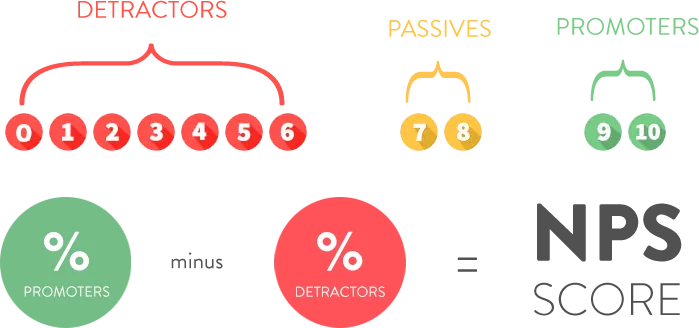
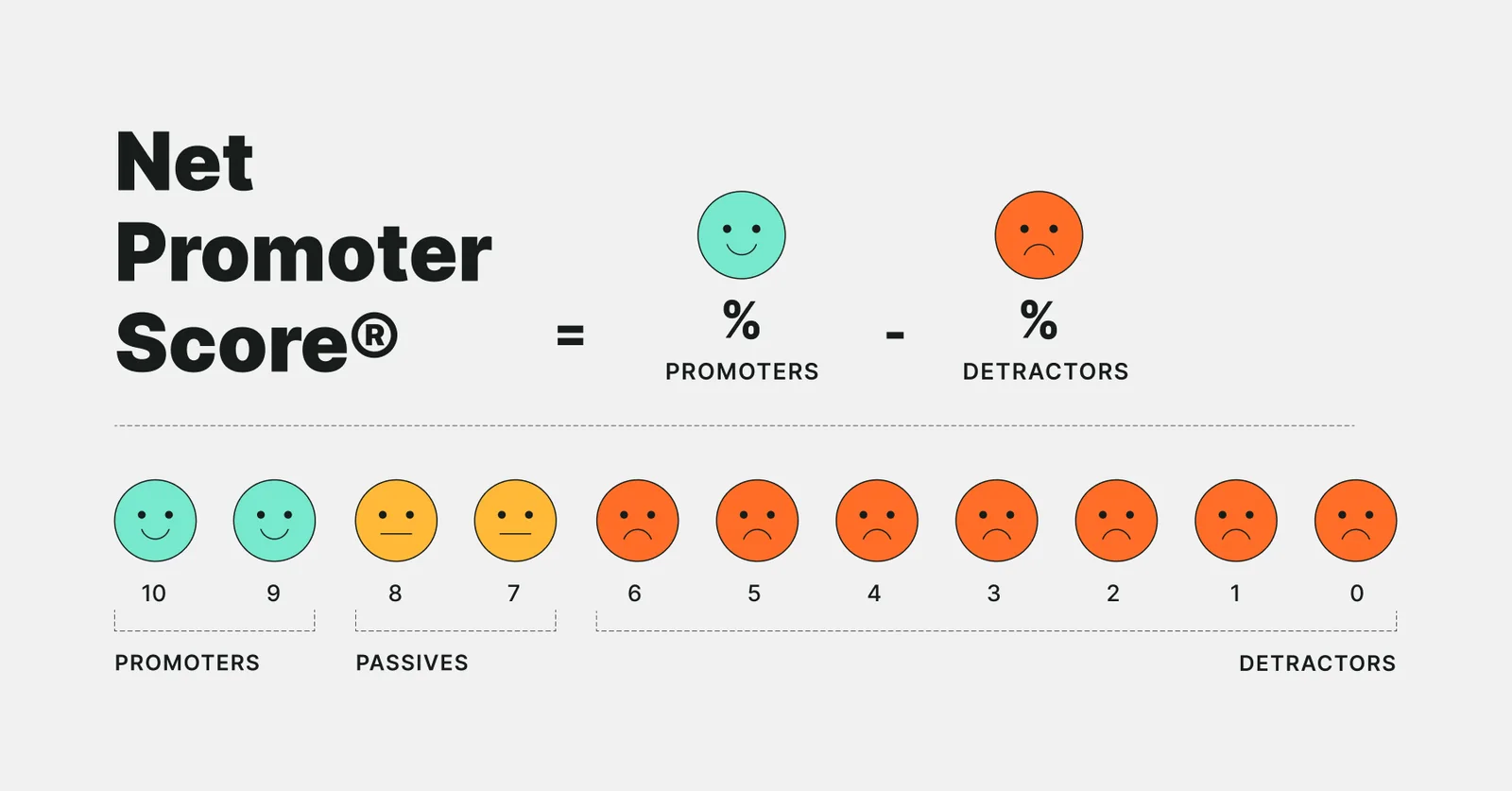
Net Promoter Score (NPS) is the percentage of promoters minus the percentage of detractors. Promoters answered 9 or 10, passives answered 7 or 8, and detractors answered 0 to 6. Passives never enter the subtraction, but they stay in the total that the percentages are based on.
NPS = % promoters − % detractors
The steps:
- Keep only respondents who gave a valid answer from 0 to 10.
- Count promoters, passives and detractors.
- Divide each count by the number of respondents.
- Subtract the detractor percentage from the promoter percentage.
- Round once, at the end, and report the base with the score.
Worked example (illustrative numbers)
Say 250 customers answer the question, with these results.
| Group | Respondents | Share of 250 |
|---|---|---|
| Promoters (9 or 10) | 110 | 44% |
| Passives (7 or 8) | 95 | 38% |
| Detractors (0 to 6) | 45 | 18% |
The check is 110 + 95 + 45 = 250. The arithmetic is 44% − 18% = 26, so NPS is +26. You can also skip the percentages: (110 − 45) ÷ 250 × 100 = 26.
How do you calculate NPS in a spreadsheet?
Put one score per row in column A, from A2 to A251. Then count each group with COUNTIF and COUNTIFS, which count only the cells that meet a condition.
| Cell | Formula | Result |
|---|---|---|
| F2, promoters | =COUNTIF(A2:A251,">=9") | 110 |
| F3, passives | =COUNTIFS(A2:A251,">=7",A2:A251,"<=8") | 95 |
| F4, detractors | =COUNTIF(A2:A251,"<=6") | 45 |
| F5, respondents | =COUNT(A2:A251) | 250 |
| F6, NPS | =(F2-F4)/F5*100 | 26 |
COUNT ignores blank cells and text such as “n/a”, which is what you want.
Two checks catch most errors. First, F2 + F3 + F4 should equal F5. Second, =COUNTIF(A2:A251,"<0")+COUNTIF(A2:A251,">10") should return 0, because a stray 11 or −1 would otherwise be counted as a promoter or detractor. Format F6 with zero decimals.
How do you calculate NPS by segment?
Add the segment in column B, such as plan type or region, and add the segment name to each condition: =COUNTIFS($B$2:$B$251,"Small business",$A$2:$A$251,">=9") counts small-business promoters. Do the same for detractors and for the segment’s respondent count, then apply the formula to those counts. To see what drives loyalty by segment, start here.
Always calculate each segment from its own counts. Never average segment scores to get an overall score unless you weight them, as the next section shows. Also check the base for each segment. A segment with 15 respondents will produce a number, but the margin of error described below makes it close to unreadable.
What is weighted NPS?
Weighted NPS adjusts the results so that each group counts in proportion to its share of your real customer base rather than its share of the sample. You need it when some customers answer more often than others.
Suppose small businesses are 60% of your customers and enterprise accounts are 40%, but responses came 25% from small businesses and 75% from enterprise (illustrative numbers, 200 respondents).
| Segment | Respondents | Promoters | Detractors | NPS | Share of customers |
|---|---|---|---|---|---|
| Small business | 50 | 25 | 10 | +30 | 60% |
| Enterprise | 150 | 45 | 36 | +6 | 40% |
| All respondents, unweighted | 200 | 70 | 46 | +12 |
The unweighted score is (70 − 46) ÷ 200 × 100 = +12, and it leans toward enterprise because enterprise answered more. Weighting by customer share gives 0.60 × 30 + 0.40 × 6 = 18 + 2.4 = 20.4, which you report as +20.
The same result comes from weighted percentages. Weighted promoters are 0.60 × 50% + 0.40 × 30% = 42%. Weighted detractors are 0.60 × 20% + 0.40 × 24% = 21.6%. And 42 − 21.6 = 20.4.
Take the weights from a source you trust, such as your customer records, and say in your notes that the score is weighted.
How big is the margin of error on NPS?
NPS is a difference between two proportions from the same sample, so its uncertainty is larger than people expect. Each respondent counts as +1 (promoter), −1 (detractor) or 0 (passive). The variance of that variable is the average of its square, p + d, minus the square of its average, p − d. Divided by the number of respondents n, the variance of the score is:
variance = (p + d − (p − d)²) ÷ n
Here p is the promoter share and d is the detractor share, both as decimals. For the 250-person example, p = 0.44 and d = 0.18:
- p + d = 0.62, and (p − d)² = 0.26² = 0.0676.
- Variance = (0.62 − 0.0676) ÷ 250 = 0.5524 ÷ 250 = 0.002210.
- Standard error = √0.002210 = 0.047, or 4.7 points.
- 95% margin of error = 1.96 × 4.7 = about ±9.2 points.
An NPS of +26 therefore sits in a range of roughly +17 to +35. Sample size matters a great deal, as this table shows with the same p and d.
| Respondents | 95% margin of error |
|---|---|
| 100 | ±14.6 points |
| 250 | ±9.2 points |
| 1,000 | ±4.6 points |
Quadrupling the sample halves the margin. To compare two independent waves of the same size, add their variances. The margin on the difference is about 1.41 times the single-wave margin, so at 250 respondents per wave a change from +26 to +32 is not distinguishable from noise.
These formulas assume a simple random sample. Weighted samples have wider margins, so treat the figures as a floor. Our guide to visualizing survey data for Net Promoter Score analysis shows how to keep that uncertainty visible on a chart.
How should you round and report NPS?
The convention is a whole number with a sign: “NPS of +26” or “NPS of −8”. It is a score, not a percentage, so leave off the percent sign.
Calculate from counts and round only the final score. Rounding the shares first can shift the answer.
Imagine 250 respondents with 106 promoters, 90 passives and 54 detractors. The exact score is (106 − 54) ÷ 250 × 100 = 20.8, which rounds to +21. But the rounded shares are 42% and 22%, and 42 − 22 = 20.
Report the base and field dates next to the score, and the margin of error when you compare groups. Shares of promoters, passives and detractors may not sum to exactly 100 after rounding, and that is fine if you note it.
How do you do this in practice?
A spreadsheet is fine for one survey. It gets slow when you track several waves, weight to customer records and cut by many segments. Halo Reports handles this kind of work with crosstabs and banner tables with weighting and significance testing, charts, and interactive report pages, including Net Promoter Score views. To share the result with colleagues, the same guide covers chart choices.
What are the common mistakes when calculating NPS?
- Dividing by promoters plus detractors. The base is every valid respondent, passives included. Leaving them out inflates both percentages.
- Averaging segment scores. A simple average of segment NPS values ignores how many customers each segment represents. Recalculate from counts or weight by customer share.
- Rounding too early. Round the final score, not the intermediate percentages.
- Counting bad data. Scores outside 0 to 10, duplicates and test responses all distort the counts. Run the validity check before you calculate.
- Reading small moves as real. A change of a few points on a few hundred responses is usually within the margin of error. Test it before you report it as a trend.
What should you do next?
Open your latest survey file and build the five-cell block above, including the two checks. Then add one segment column, calculate the score for each segment, and compute the margin of error for each one. If any segment has a margin wider than its gap to the others, say so when you share the results, and decide whether weighting is needed before the next wave. A ranked view of what changed flags moves to check.