
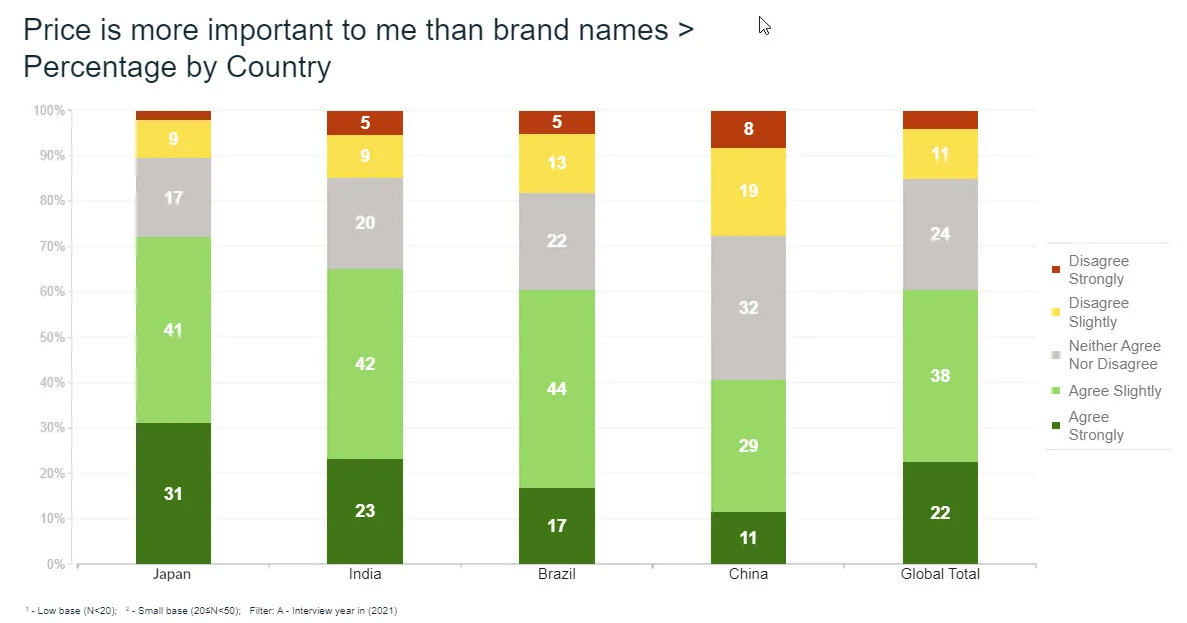
You have asked the same question of several groups, such as three age bands or five countries, and the answer is a scale from strongly disagree to strongly agree. A table of 25 numbers is accurate but hard to scan. A stacked bar chart turns each group into one bar, so the shape of opinion shows at a glance. This article is part of our guide to charting survey data, and it covers how to build a survey bar graph from stacked bars, how to read it, and when it hides what you need to see.
Key takeaways
- A stacked bar chart splits each bar into segments, one per answer option, so you can see how each group’s total divides into parts.
- Most survey questions call for a 100% stacked bar, because every bar is the same length and you compare the mix of answers, not group size.
- Keep segments in scale order, use two hues with a gray middle, and limit the chart to about five segments so readers can match colors.
- A diverging stacked bar centers each bar on the neutral answer, so you can compare agreement with disagreement and see net agreement, such as +42 points.
- Stacking works for the first segment and the total but poorly for middle answers, so use a plain bar chart when one middle answer matters most.
What is a stacked bar chart, and how is it different from a 100% stacked bar?
In a stacked bar chart, each bar represents one group, such as a country or age band. The bar is divided into segments, one for each answer option, and each segment is placed end to end. The length of a segment is its value, and the full length of the bar is the total.
There are two versions, and the difference matters for survey work.
- Stacked (absolute). Segments show counts, or percentages of the whole sample. Bars have different lengths when groups have different sizes, so you can compare totals.
- 100% stacked. Segments show percentages within each group, and every bar is the same length. You compare the mix of answers, not the size of the group.
Most survey questions call for the 100% version. If 600 people in one group and 100 in another answered, a plain stacked chart shows a long bar and a short bar. That tells you who was sampled more heavily, not how the groups feel.
The chart at the top of this article is a 100% stacked bar. It shows agreement with a price statement in four countries and a global total, and every bar fills the full 100%.
How do you build a stacked bar chart for survey data?
- Choose the base. Decide who each percentage is out of, usually everyone in the group who answered the question. State the base on the chart.
- Lay out the table. Put groups in rows and answer options in columns. Check that each row adds up to 100%, allowing a point either way for rounding.
- Order the segments. Put them in the order of the scale, with no reshuffling by size.
- Pick the chart type. Choose 100% stacked for percentages within groups, or stacked for counts.
- Label directly. Print the percentage inside each segment large enough to hold it, and drop the label from tiny ones.
- Add a title that states the question. Use the exact question wording, such as “I trust this brand to keep its promises”.
What does a worked example look like?
The numbers below are illustrative, not from a real survey. Imagine 1,200 respondents, 400 in each of three age groups, asked to rate agreement with “I trust this brand to keep its promises.”
| Age group | Strongly disagree | Disagree | Neither | Agree | Strongly agree | Total |
|---|---|---|---|---|---|---|
| Under 35 | 6% | 12% | 22% | 38% | 22% | 100% |
| 35 to 54 | 8% | 14% | 28% | 34% | 16% | 100% |
| 55 and over | 4% | 8% | 18% | 40% | 30% | 100% |
Check the rows. For the first group, 6 + 12 + 22 + 38 + 22 = 100. For the second, 8 + 14 + 28 + 34 + 16 = 100. For the third, 4 + 8 + 18 + 40 + 30 = 100.
Now read it. Add the two agree segments to get the top-two-box share. That gives 38 + 22 = 60% for under 35s, 34 + 16 = 50% for the middle group and 40 + 30 = 70% for the oldest.
The bottom-two-box shares are 18%, 22% and 12%. The middle group is the least convinced, and its largest “Neither” segment, 28%, is the reason.
In a 100% stacked bar, the segment at the baseline is easy to compare across groups because every bar starts at the same line. The segments in the middle, such as “Neither”, are harder to compare, because they float with no common starting line.
How do diverging stacked bars work for Likert data?
A diverging stacked bar fixes that floating-segment problem. Instead of starting every bar at zero, you center it on the neutral point. Negative answers extend to the left, positive answers extend to the right, and the neutral segment is split across the center line.
This lets you compare the two things people usually care about: how much agreement there is and how much disagreement. In our example, the left side would be 18%, 22% and 12%, and the right side 60%, 50% and 70%. Subtracting gives net agreement of +42, +28 and +58 points, and it is easy to see who sits furthest from zero. For more on how to handle the scale itself, see our article on using the Likert scale for visualizing survey data.
Use a diverging bar when the scale has a real midpoint and the question is about the balance of opinion. Use a standard 100% stacked bar when the scale has no neutral point, or when a reader needs to see how the whole group divides.
What ordering and color rules should you follow?
- Keep the scale order. Strongly disagree to strongly agree, left to right. Never sort segments by size within a bar.
- Sort the bars, not the segments. If the groups have no natural order, rank the bars by the share you want readers to compare, such as top-two-box. Keep natural orders, such as age bands or survey waves, as they are.
- Use a sequential or diverging palette. Two hues, one for disagreement and one for agreement, with the shade deepening toward the strong ends. Use a neutral gray for the middle. The hero image uses this pattern.
- Do not use a rainbow. A variety of unrelated colors makes the legend harder to match, and colors chosen for appeal work against reading the scale.
- Check for color blindness. Red and green alone are risky, so vary the lightness as well as the hue, and label segments directly.
- Put the segment you compare most at the baseline. Only the first segment shares a starting line across bars, so place the answer that matters there.
When does stacking hide the comparison you need?
Stacking is the wrong choice more often than people expect. The chart reads well for the first segment and the total, and poorly for everything in between.
- You need to compare one middle answer. Comparing the “Neither” share across ten groups is hard when the segments float. Use a plain bar chart of that one answer, or a column chart across waves.
- There are too many segments. Past five or six, color matching breaks down. Group answers, or show a table.
- Small bases. A segment based on 15 people can look as solid as one based on 400. Mark low bases, and do not stack percentages when a group has too few respondents to split five ways.
- Absolute totals are mixed with percentages. If bar length means group size on one chart and 100% on another, readers will misread both.
- Time trends. Only the bottom segment has a steady baseline across waves. Use lines for the series that matters.
How do you do this in practice?
You can build the chart in any spreadsheet, but the work that takes time is getting the percentages right, with the right base, weighting and a check for differences that are bigger than chance. Halo Reports produces crosstabs and banner tables with weighting and significance testing, and turns them into charts and interactive report pages. See Halo Reports for what it does. For a scale you track every wave, mTab Pulse monitors trackers and studies and surfaces meaningful movement, so you can see which segments have shifted.
Next time you chart a scale question, start with the 100% stacked bar, then ask whether one answer matters more than the others. If it does, pull that answer out into its own bar chart beside it. When the result is going to leadership, an executive brief can turn it into a one-page update of what changed, why it matters and what to do.