
You have a table of survey results and need to show it in a way that people can read in seconds. Whether you are comparing countries, age groups or waves of a tracker, the column chart is one of the most common ways to do it. This article covers how it works, how it differs from a bar chart, and how to design one that does not mislead. It is part of our guide to charting survey data, which compares the main chart types side by side.
Key takeaways
- A column chart uses vertical bars to compare values across categories or over time, and the height of each column is proportional to its value.
- Column and bar charts differ only in direction, so choose columns for time and short labels, and horizontal bars for long labels or many categories.
- Use clustered columns to compare series within a category, and stacked or 100% stacked columns to compare totals or the composition of each column.
- A column chart suits a small number of periods, such as four quarters or six tracker waves, while a line chart handles dozens.
- Start the axis at zero, order columns deliberately, label them directly, and show the base, such as n = 500 per wave.
How do you read a column chart?
Read a column chart from the bottom up. The horizontal axis (x-axis) lists the categories or time periods. The vertical axis (y-axis) is the measure, such as a percentage of respondents, a count or an average score. The taller the column, the larger the value.
Because every column starts from the same zero baseline, you compare values by comparing heights, and the eye is good at that.
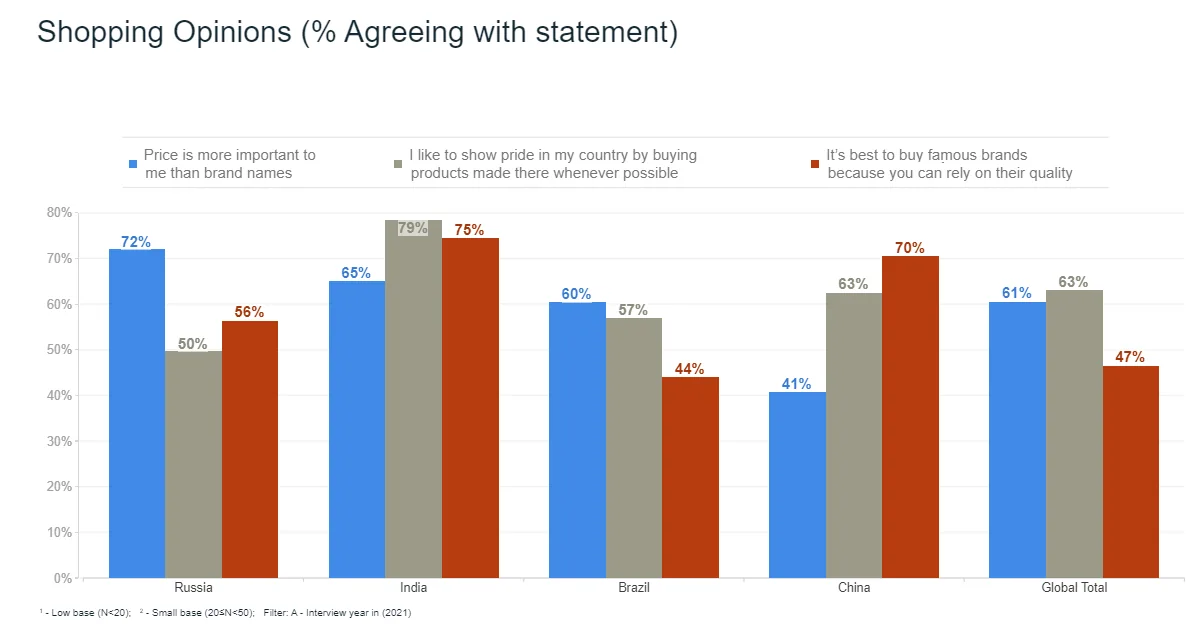
The chart at the top of this page is a typical survey example. Each cluster is a country, and each colored column shows the percentage agreeing with one of three statements about shopping. Each column has its value printed on it, so no one has to estimate from the gridlines.
What is the difference between a column chart and a bar chart?
The only structural difference is direction. A column chart draws its bars vertically, and a bar chart draws them horizontally. Many people use “bar chart” for both, and the logic is identical, so the real question is which orientation reads better for your data. Our guide to bar charts covers the horizontal version in detail.
| Situation | Better choice |
|---|---|
| Time on the x-axis (months, quarters, waves) | Column chart |
| Few categories with short labels | Column chart |
| Long category names, such as full answer statements | Bar chart |
| Many categories (more than about eight) | Bar chart |
| Ranking items from highest to lowest | Bar chart |
Readers expect time to run left to right, which only a vertical layout gives you. And long labels fit comfortably beside horizontal bars but get squeezed or tilted under columns.
What are the main types of column chart?
There are four variants you will use most often.
- Simple column chart: one column per category, showing one measure. It is the right choice for a single question, such as the share of customers choosing each answer option.
- Clustered column chart: several columns grouped side by side within each category, one per series. The chart at the top of this page is clustered. Use it to compare series within a category, such as three statements within each country.
- Stacked column chart: the series are stacked on top of each other in a single column, so the column’s height is the total and each segment is a part of it. Use it when the total matters as much as the parts.
- 100% stacked column chart: every column is scaled to the same height, so each segment shows its share of that column. Use it to compare composition when the totals differ or are not the point.
The 100% stacked version is the standard way to show a rating scale. In the example below, each column is a country, and the segments run from agree strongly at the bottom to disagree strongly at the top. Because each column fills the full height, you can compare the shape of opinion across countries at a glance. We go further into this in our guide to stacked bar charts and in using the Likert scale to visualize survey data.
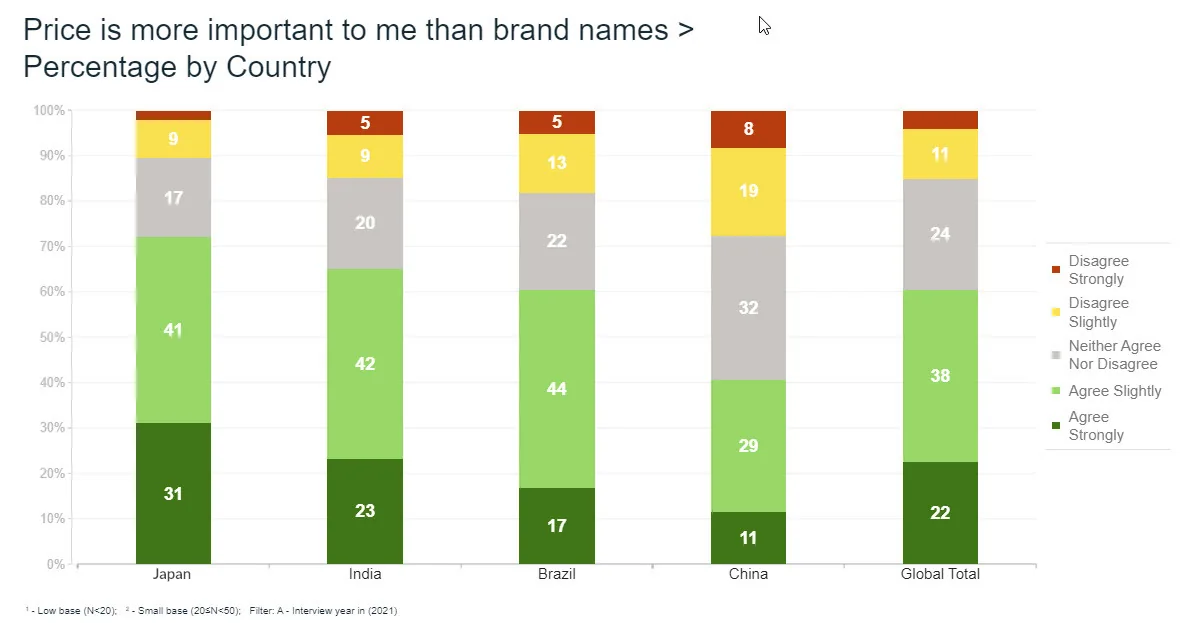
Choose clustered columns to compare series, since they share one baseline. Choose stacked columns to compare totals or composition. In a stacked chart only the bottom segment sits on a shared baseline, so higher segments are harder to compare across columns.
How do you use a column chart for data over time?
Put time on the x-axis, in order, with equal intervals. A column chart suits a small number of periods, such as four quarters or six tracker waves. With dozens of periods, a line chart shows the trend more cleanly.
Worked example: brand awareness across four waves
The numbers below are illustrative. Suppose a brand tracker asks 500 respondents each quarter whether they have heard of two brands. Each percentage is the number aware divided by 500.
| Wave | Brand A aware | Brand A share | Brand B aware | Brand B share |
|---|---|---|---|---|
| Q1 | 190 | 190 ÷ 500 = 38% | 175 | 175 ÷ 500 = 35% |
| Q2 | 205 | 205 ÷ 500 = 41% | 180 | 180 ÷ 500 = 36% |
| Q3 | 230 | 230 ÷ 500 = 46% | 170 | 170 ÷ 500 = 34% |
| Q4 | 245 | 245 ÷ 500 = 49% | 165 | 165 ÷ 500 = 33% |
To chart it, put the four waves on the x-axis, put percent aware on the y-axis starting at 0%, and draw two columns per wave, one for each brand. That is a clustered column chart. Brand A climbs from 38% to 49%, an 11-point rise, while Brand B drifts down by 2 points.
Before you call the story, remember sampling error. With 500 respondents per wave, a single percentage near 40% carries a margin of error of roughly plus or minus 4 points at 95% confidence. The 3-point step from Q1 to Q2 for Brand A could be noise, while the 11-point change over the year is much harder to explain that way.
Test differences before you headline them. mTab Pulse monitors trackers and studies and surfaces meaningful movement, so the changes worth charting reach you first.
How do you design a column chart that people can read?
- Start the axis at zero. Column height is the data. A truncated axis turns a 3-point gap into what looks like a doubling.
- Order the columns deliberately. Keep time and ordered scales in their natural sequence. For unordered categories, sort from highest to lowest, with “Other” and “Don’t know” last.
- Label the columns directly. Printed values let you drop most gridlines.
- Limit the series. In a clustered chart, two to four series per cluster is readable. Beyond that, split the chart.
- Use color to carry meaning. Give each series one color and keep it the same across every chart in the report. Use a single color when there is only one series.
- Show the base. Add a note such as “n = 500 per wave” so readers know how many people stand behind each column. Flag low bases too, as the footnotes on the charts above do.
When should you not use a column chart?
- A simple split of one whole. A pie chart shows two or three parts in one glance.
- Long labels or many categories. Switch to a horizontal bar chart, where text has room.
- Continuous trends over many periods. A line chart shows direction and turning points better than 30 columns.
- Distributions of continuous numbers. Ages or incomes grouped into bins belong in a histogram, where bars touch and bin order is fixed.
- Multiple-response questions shown as a stacked column. Percentages that total more than 100% cannot be stacked to a whole. Use a simple or clustered column or a bar chart instead.
How do you make a column chart in practice?
Tabulate first, then chart. Halo Reports runs crosstabs and banner tables with weighting and significance testing, and turns the results into charts and interactive report pages, so the columns you present match the tables behind them.
Before your next report, look at the chart you were about to build and ask one question. Is the x-axis a time period or a short list of categories? If so, use columns. If the labels are long or the list is long, turn the chart on its side.
When the chart is going to leadership, an executive brief can carry it as a one-page update of what changed, why it matters and what to do.