
You have one survey question whose answers add up to everyone who responded, and you want to show the split with something more polished than a plain pie. A donut chart is the usual answer, and it is easy to make badly. This article explains how to read one and when to pick a different chart. It is part of our guide to charting survey data, which compares the common chart types side by side.
Key takeaways
- A donut chart shows how one whole splits into categories as a ring, with each segment’s arc length proportional to its share and segments summing to 100%.
- Calculate it like a pie chart: divide each count by the total, then multiply by 360 degrees, so each 1% of the whole takes 3.6 degrees.
- Use a donut for five or fewer categories when a total or headline figure belongs in the hole; otherwise a pie chart does the same job.
- Choose a bar chart instead for more than five categories, close values such as 24%, 26%, 25% and 25%, or multiple-response questions that exceed 100%.
- Label segments directly, keep the chart flat, and avoid nested rings, because multi-ring donuts make equal shares look unequal.
What does a donut chart show?
A donut chart shows parts of one whole. The full ring is the total, which might be all respondents, all sales or all answers to one question. Each segment is a category, and a longer segment means a larger share. Segments always sum to 100% of the ring.
The only structural difference from a pie chart is the hole in the middle. Both charts answer the same question, “how is this whole divided?”, so everything in our guide to the pie chart about slices, shares and angles applies here too. Doughnut chart and ring chart mean the same thing.
How do you read a donut chart?
Read a donut chart in four steps.
- Check what the whole ring stands for, and the base. “n = 800 respondents” tells you the total behind the percentages.
- Compare segment lengths along the ring. A segment covering a quarter of the ring is 25%, and one covering half of it is 50%.
- Read the labels. Each segment should carry its category name and its percentage.
- Check the center. If the hole holds a number, such as a total or an average score, treat it as context for the split, not as another segment.
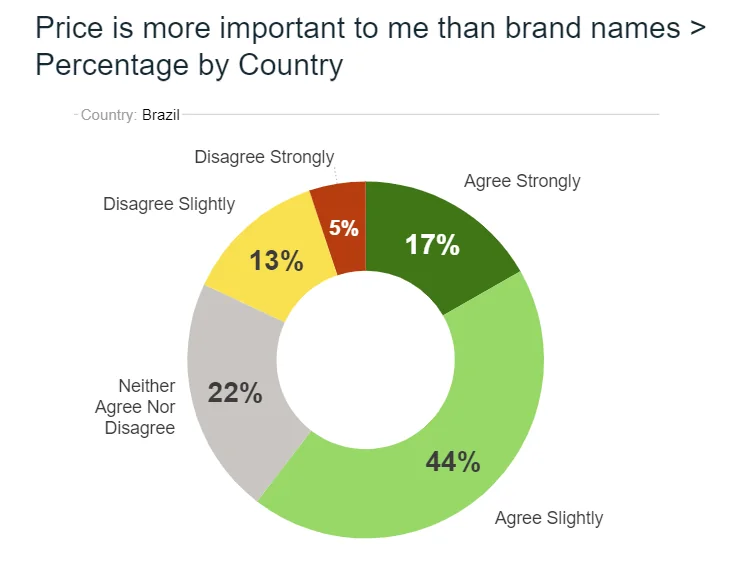
Here is a donut chart from a survey question about price and brand names, split by country. The segments run from “agree strongly” to “disagree strongly”, and the percentages sit on the ring.
In the chart, 17% agree strongly and 44% agree slightly, so 61% agree in some way. The rest is 22% neither, 13% disagree slightly and 5% disagree strongly. Those five labels add to 101%, which is a rounding effect: each percentage was rounded to a whole number. A footnote saying so is better than quietly changing a figure.
How do you calculate a donut chart?
Calculate a donut chart exactly as you would a pie chart. Divide each category’s count by the total to get its share, then multiply the share by 360 degrees to get the angle the segment sweeps. Each 1% of the whole takes 3.6 degrees. The hole changes none of the numbers.
Worked example: a product concept test
Suppose 800 respondents saw a new product concept and answered a purchase-intent question. The figures below are illustrative.
| Answer | Respondents | Share of total | Angle (share × 360°) |
|---|---|---|---|
| Would buy | 320 | 320 ÷ 800 = 40% | 0.40 × 360 = 144° |
| Might buy | 240 | 240 ÷ 800 = 30% | 0.30 × 360 = 108° |
| Would not buy | 160 | 160 ÷ 800 = 20% | 0.20 × 360 = 72° |
| Not sure | 80 | 80 ÷ 800 = 10% | 0.10 × 360 = 36° |
| Total | 800 | 100% | 360° |
Check the angles by adding them: 144 + 108 + 72 + 36 = 360. Then put “800 respondents” in the hole and label each segment with its percentage.
What are some donut chart examples?
A donut chart suits a single-choice question with a few answers and a total worth showing. Common examples:
- Survey results. Preferred purchase channel, yes, no and unsure, or a five-point agreement scale like the one above, with the response count in the hole.
- Customer demographics. Respondents by age band or region, where the groups are few.
- Share of sales. Revenue by product line, with the total revenue in the center.
- Traffic sources. Website visits split by source, such as search, direct and referral.
- Progress toward a target. A single segment against the remainder, for instance 70% of a quota complete. This is a pie chart with two parts, and the hole holds the percentage.
For a scale that runs from agree to disagree, keep the segments in scale order and color them from one end to the other, as the chart above does. Our article on using the Likert scale to visualize survey data covers that in more depth.
When should you use a donut chart instead of a pie chart?
Use a donut when the hole earns its place. That means you have a total or key figure to show, or you want a slightly lighter look on a report page or slide. Otherwise a plain pie does the same job.
| Situation | Better choice |
|---|---|
| Two to five parts of a whole, with a headline total to show | Donut chart |
| Two to five parts of a whole, nothing extra to show | Pie chart or donut chart |
| Close values, such as 24%, 26%, 25% and 25% | Bar chart |
| More than five categories | Bar chart |
| The same split across several groups or waves | Stacked bar chart |
| Multiple-response questions that exceed 100% | Bar chart |
A donut is read by arc length, while a pie is read by angle and area. People judge length along a shared baseline more accurately than angle or area, which is why bars win when precision matters. Our guide to the bar chart explains how to build one.
How do you design a donut chart people can read?
- Keep segments to five or fewer. Group the smallest into “Other” and say what it contains.
- Order by size, or by scale. Start the largest segment at 12 o’clock and run clockwise from big to small. For an ordered scale, such as strongly disagree to strongly agree, keep the scale order.
- Label segments directly. Put the category and percentage on or beside each segment so nobody has to match colors to a legend.
- Size the hole for its content. The hole should fit a short label, but a thin ring makes segments hard to compare. If the inner radius is 60% of the outer radius, the hole removes 36% of the circle’s area (0.6 × 0.6 = 0.36), and the ring still has room for labels.
- Keep it flat. Skip 3D effects. Tilting the ring makes front segments look larger than back ones.
What are the common mistakes with donut charts?
- Too many segments. Eight thin arcs cannot be compared. Use a bar chart.
- Nested rings for different questions. Multi-ring donuts are hard to read because each ring has a different length, so equal shares look unequal. Draw two charts or use stacked bars.
- A crowded center. Put one figure and a short label in the hole, such as the base or a headline score.
- Percentages that do not sum to 100%. Rounding can leave you at 99% or 101%. Say so in a footnote.
- Using it for multiple-response data. If respondents can pick several answers, there is no single whole to divide.
A “stacked donut”, where each segment is split into sub-segments, has the same problem. If you need to show parts within parts, a stacked bar chart makes the comparison much easier.
How do you make a donut chart in practice?
Tabulate the question first, so you have counts and percentages, then chart the result. In Halo Reports you can run weighted crosstabs with significance testing and turn the results into charts and interactive report pages, so the chart you share is based on the same numbers as your tables. Spreadsheet tools can draw a donut chart too, once you have checked the percentages. To see which splits have shifted since the last wave, mTab Pulse monitors trackers and studies and surfaces meaningful movement.
Before your next donut chart, count the categories and look at how close the shares are. If you have five or fewer and one clear total worth showing, a donut works. If not, make it a bar chart. If the chart is headed for senior readers, an executive brief can carry the result as a one-page update of what changed, why it matters and what to do.