
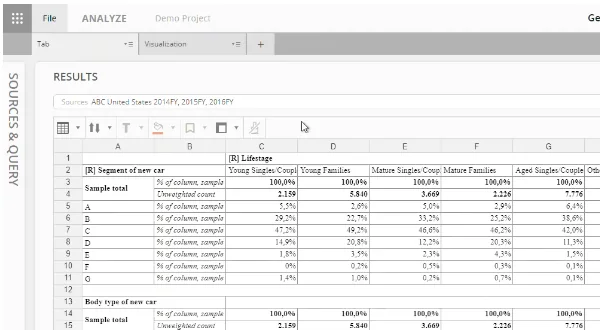
You have a finished survey, a few hundred questions, and a request to show results by age, region, customer type and last year’s wave. A spreadsheet can start that job. It rarely finishes it well, and that gap is why crosstab software exists.
This article explains what crosstab software does, how to judge the best option for your survey data, and when an online crosstab tool beats a desktop or spreadsheet setup. If you are new to the table itself, start with our guide to crosstabs, banners and how they compare with pivot tables.
Key takeaways
- Crosstab software knows what a survey is, so it builds banner tables, applies weights and nets, handles multiple-response questions and flags significant differences without hand-built formulas.
- The best software for crosstab analysis of survey data is the one that handles your hardest study: weights, trackers, many markets, and the people who need to read the results.
- Online crosstab tools win on sharing and collaboration; desktop and spreadsheet tools suit one analyst working alone on a small study.
- Test any cross tabulation tool on a survey you have already reported, and check the numbers match.
What does survey crosstab software do that a spreadsheet does not?
A spreadsheet is a blank grid. Survey crosstab software knows what a survey is: respondents, questions, answer options, weights and scales. That knowledge lets it do six things without hand-built formulas. For the spreadsheet route step by step, see how to make a crosstab in Excel.
Banner tables
A banner is the set of columns across the top of a crosstab: Total, then age bands, then region, for example. You define it once, and every question runs against it. A 200-question study gives you 200 tables with identical columns, so readers learn the layout once. Our guide to banner tables in market research covers how to design one.
Weighting
Samples rarely match the population. If your sample is 60% women and your target audience is 50% women, results need weights. Crosstab software applies a weight to every table, shows weighted percentages, and keeps unweighted counts visible so readers can judge how many people stand behind each number.
Nets and top-box scores
A net combines answer options into one row, such as “top-2 box” (the two highest points on a 5-point scale). Software lets you define a net once and reuse it in every table and wave. By hand, you add rows and recheck the sum each time the data changes.
Multiple-response questions
When respondents can pick several options, percentages should be based on respondents, not answers. Illustrative example: of 1,000 respondents, 600 used online, 450 used a store and 200 used an app. That is 60%, 45% and 20%, a total of 125%, and it is correct. A pivot table that counts rows gets this wrong.
Significance testing
Is 50% really higher than 30%, or is that sampling noise? Crosstab software tests every pair of columns and marks the cells that differ, often with column letters. It also uses an effective base when weights are present. Our guide to significance testing in crosstabs explains how to read those marks.
Tracking waves
In a tracker you ask the same questions every quarter or year. Software stacks waves as columns, tests each wave against the previous one, and adds a new wave without rebuilding the tables. This is where manual work costs the most time.
What does a worked example look like?
Take 1,000 respondents rating purchase intent on a 5-point scale. The sample has 600 women and 400 men, but the target market is 50/50. Illustrative figures, column percentages:
| Purchase intent | Women (n=600) | Men (n=400) | Total, weighted |
|---|---|---|---|
| Definitely would buy | 20% | 10% | 15.0% |
| Probably would buy | 30% | 20% | 25.0% |
| Might or might not | 25% | 30% | 27.5% |
| Probably would not | 15% | 25% | 20.0% |
| Definitely would not | 10% | 15% | 12.5% |
| Net: top-2 box | 50% | 30% | 40.0% |
The weights are 500 / 600 (about 0.83) for each woman and 500 / 400 = 1.25 for each man. Women’s top-2 box is 300 respondents, and 300 x 500 / 600 = 250 weighted. Men’s is 120, and 120 x 1.25 = 150.
The weighted total is (250 + 150) / 1,000 = 40%. Without weights you would report 420 / 1,000 = 42%, which overstates intent because women are over-represented.
Is the 20-point gap real? A two-proportion z-test gives a pooled share of 0.42, a standard error of the square root of 0.42 x 0.58 x (1/600 + 1/400), or about 0.032, and a z of 0.20 / 0.032, about 6.3. That is far beyond the usual 1.96 cutoff, so software would flag women’s 50% as significantly higher than men’s 30%. This simple check ignores the effect of weights, which software handles with an effective base.
What is the best software for crosstab analysis of survey data?
The best software for crosstab analysis of survey data is the tool that handles your most demanding study without workarounds, and that your readers can use. A one-off survey with no weights needs little more than banners and exports. A multi-market tracker needs weighting, fixed nets, wave-on-wave testing and controlled sharing. Judge every option against the same checklist, using your own data rather than a demo file.
| Criterion | What to test | Why it matters |
|---|---|---|
| Imports | Load your survey platform’s export, with labels and answer codes | Tables should arrive readable, not as variable codes |
| Banners | Apply one banner to every question in the study | One setup should produce the whole table set |
| Weighting | Weighted percentages next to unweighted counts | Readers need both the estimate and the base |
| Nets | Define a top-2 box once and reuse it | Hand-built nets drift between tables and waves |
| Multiple response | Check that bases are respondents, not answers | Row-counting tools get these percentages wrong |
| Significance testing | Stated method, confidence level and base | Flags are only useful if you know what they mean |
| Tracking | Add a new wave without rebuilding | Trackers are where manual work piles up |
| Sharing | Exports plus interactive results for non-specialists | Most readers will never open the data file |
| Audit trail | See which weight and filter produced each number | You will be asked where a figure came from |
Not every team needs every row. Weight the criteria by how often you run each kind of study, then score each tool on a real project.
Should you use an online crosstab tool or desktop and spreadsheet software?
The choice is less about features than about who touches the data. An online crosstab tool runs in a browser, so analysts and stakeholders work from the same tables. Desktop tabulation software and spreadsheets sit on one person’s machine, and results travel as files.
| Spreadsheet | Desktop tabulation software | Online crosstab tool | |
|---|---|---|---|
| Setup | Familiar, but every table is built by hand | Powerful, often scripted by a specialist | Point-and-click banners and filters |
| Survey features | Weights, nets and tests added manually | Usually full | Varies; check the checklist above |
| Sharing | Files emailed as attachments | Exported tables and slides | Links to live, filterable results |
| Corrections | Retyped in every copy | Rerun and re-export | Flow through to every view |
| Access control | By file | By file | By user, study or team |
A spreadsheet is fine for one small table. Desktop tools suit a specialist producing large table sets for others to read. An online crosstab tool fits when many people need to explore the same survey, or when a tracker is reported every wave. If you go online, check where the data is stored and who can see each study.
How do you do this in practice?
mTab works on survey data you already have; it does not collect responses. You import the export from your survey platform, and Halo Reports provides crosstabs and banner tables with weighting and significance testing, charts, and interactive report pages you can share. When a stakeholder has a follow-up question, they can ask questions in plain language and get answers from your own research, with the source shown.
What are common mistakes when using crosstab software?
- Reading percentages without the base. A 60% on a base of 12 respondents means little. Check the unweighted count before you quote a number.
- Reporting every significance flag. With hundreds of tables, some differences appear by chance. Treat flags as leads, and confirm the ones that matter.
- Weighting to the wrong target. Weights should reflect the population you want to describe. Document the targets and apply them consistently across waves.
- Changing a net or banner between waves. A tracker only works when definitions stay fixed. Change one, and you cannot compare to last quarter.
- Choosing a tool on a demo file. Demo data is clean. Your data has messy codes, open ends and missing values, so test with it.
What should you do next?
Pick one real survey you have already reported, and rebuild its main table in the crosstab software you are considering. Time the work, check the weighted figures against the ones you published, and confirm the significance flags match. If the numbers agree and setup took minutes, you have a good candidate. Insights teams running wide, complex studies and global brand trackers may also want one governed platform for their research.