
You have a survey with a dozen or more rating questions and one outcome you care about, such as overall satisfaction. The numbers are easy to produce. The hard part is showing them so a decision maker sees what matters in about ten seconds.
This article covers the main ways to chart correlation analysis in survey research, what each chart is good at, and what goes wrong with 5-point scales. In a correlation survey analysis, the chart you choose decides whether the finding gets used.
The examples come from a fictional spaceship purchase survey, and all numbers are illustrative.
Key takeaways
- To visualize correlations in survey data, match the chart to the question: scatter plot for one pair, heatmap for a matrix, sorted bar chart for one metric.
- A driver chart ranks each question’s correlation with one outcome, but overlapping drivers and causation limit it, so read the bars as association, not proof.
- Five-point scales put 1,000 respondents on only 25 possible positions, so use a bubble plot sized by area, or add jitter, to show where people really are.
- Check the heatmap color scale: when every correlation is positive, a red-to-blue scale makes the weaker positive values look negative.
- Compare groups side by side only after checking group sizes, because correlations from small groups swing widely and differences may be noise.
Why is a table of correlations hard to read?
A correlation matrix lists every question as a row and as a column, so each value appears twice, once above the diagonal and once below. With 11 questions you get 55 distinct pairs. Nobody can scan that and know where to look.
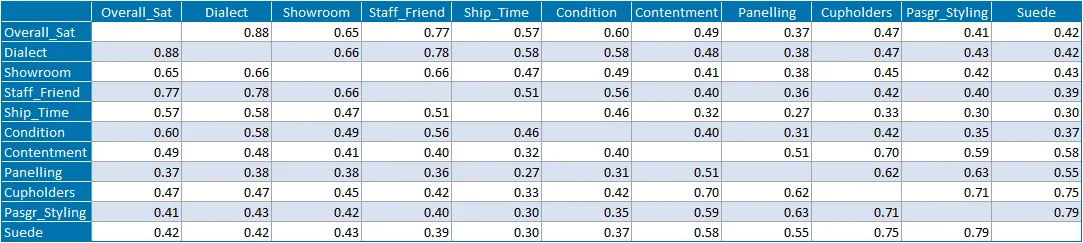
The matrix is the right thing to calculate and the wrong thing to show. Decide what the audience is asking, then pick the chart that answers it.
When should you use a scatter plot?
Use a scatter plot when you care about one pair of questions. Each respondent is a dot, with one question on the x-axis and the other on the y-axis. The cloud of dots shows what a single coefficient cannot: whether the relationship is a straight line, a curve, or driven by a few outliers.
A coefficient of 0.4 can come from a steady upward pattern or from one tight cluster plus a few extreme respondents. Only the plot tells you which. If you go on to fit a line, a plot of the residuals shows where the line misses.
Scatter plots stop working past a handful of pairs, since twenty questions would need 190. That is the job of a heatmap.
How does a heatmap show a correlation matrix?
A heatmap keeps the matrix layout and replaces most of the reading with color. Each cell is shaded by the size of the coefficient, so strong relationships jump out and weak ones fade.
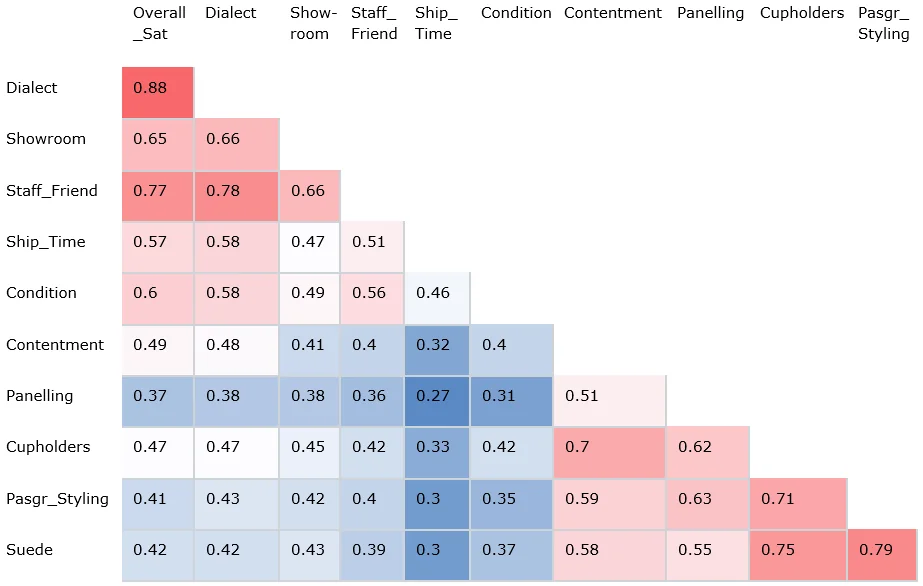
In the Overall Satisfaction column, the eye goes straight to Dialect (0.88) and Staff Friendliness (0.77). The heatmap also shows something a single column cannot: the four interior items, Contentment, Cupholders, Passenger Styling and Suede, correlate with one another at roughly 0.6 to 0.8, a cluster that stays visible when you read across rows.
One detail to check on any heatmap is the color scale. In this example every correlation is positive, between 0.27 and 0.88.
The blue cells are not negative correlations. They are the weaker positive ones. If your scale is red for positive and blue for negative, make sure the legend says what the colors mean, or center the scale on zero only when your data actually crosses zero.
Past 25 or so questions the labels get small, so filter to the questions that matter first.
What is a driver chart?
A driver chart is a sorted bar chart of every question’s correlation with one key metric. It answers the question most survey readers are really asking: what moves overall satisfaction (or purchase intent, or likelihood to recommend)? Here are the correlations with Overall Satisfaction from the example survey, strongest first.
| Question | r with Overall Satisfaction | r squared |
|---|---|---|
| Dialect | 0.88 | 0.77 |
| Staff Friendliness | 0.77 | 0.59 |
| Showroom | 0.65 | 0.42 |
| Condition | 0.60 | 0.36 |
| Shipping Time | 0.57 | 0.32 |
| Contentment | 0.49 | 0.24 |
| Cupholders | 0.47 | 0.22 |
| Suede | 0.42 | 0.18 |
| Passenger Styling | 0.41 | 0.17 |
| Panelling | 0.37 | 0.14 |
The right-hand column squares each coefficient, which gives the share of variation in satisfaction that a straight line through that question accounts for. Dialect: 0.88 × 0.88 = 0.77, so about 77%. Panelling: 0.37 × 0.37 = 0.14, so about 14%.
A driver chart has a limit you should state on the slide. Dialect and Staff Friendliness correlate with each other at 0.78, so their bars partly describe the same thing. A bar chart cannot separate overlapping drivers. That takes a regression model, and the chart is where you decide which questions go into it.
Some analysts prefer a radial layout, with the key metric at the center and each question placed by its distance from it.
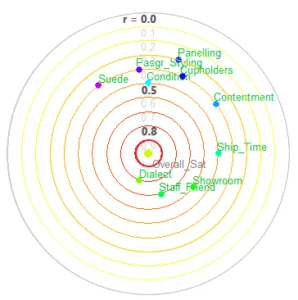
The cost is legibility. Labels collide where questions have similar values, as Panelling, Cupholders and Passenger Styling do here. A sorted bar chart is easier to label and to read exactly.
How do you chart 5-point survey scales?
A 5-point item can only take five values. Plot satisfaction against likelihood to recommend, both on 1 to 5, and 1,000 respondents land on just 25 possible positions. Hundreds of dots sit exactly on top of each other, and a position with 160 people looks the same as one with 5.
Here is an illustrative cross-tab of those 1,000 respondents. Each cell is a count.
| Satisfaction (rows) / Recommend (columns) | 1 | 2 | 3 | 4 | 5 |
|---|---|---|---|---|---|
| 1 | 40 | 20 | 5 | 0 | 0 |
| 2 | 25 | 60 | 40 | 10 | 0 |
| 3 | 10 | 50 | 120 | 60 | 10 |
| 4 | 0 | 15 | 90 | 160 | 50 |
| 5 | 0 | 0 | 10 | 80 | 145 |
There are two fixes.
- Bubble plot. Draw one circle per cell and make its area proportional to the count. The 160 cell becomes a large bubble, the 5 cell a speck, and the diagonal band of the relationship shows up. Size by area, not by diameter, or large counts look exaggerated.
- Jitter. Add a small random offset to each respondent’s position, say up to 0.2 of a scale point in each direction, so the dots spread into a cloud. Jitter is for display only. Compute the correlation on the real answers, and say in a caption that the plot is jittered.
Choose bubbles when you need exact counts on a coarse scale, and jitter when you want the familiar scatter look. On 0 to 10 scales the overlap is smaller but still present in large samples.
Because ordered ratings are not truly continuous, consider Spearman rather than Pearson for the coefficient, as the correlation matrix guide explains.
Which chart works best for correlation survey results?
| Your question | Chart | Watch for |
|---|---|---|
| How do these two questions relate? | Scatter plot, with jitter or bubbles on short scales | Curves and outliers a coefficient hides |
| Which questions in my survey move together? | Heatmap of the matrix | The color scale, and too many questions |
| What drives my key metric? | Sorted bar chart (driver chart) | Overlapping drivers, and causation |
| Does the pattern differ by group? | Side-by-side heatmap columns | Small group sizes |
The last row deserves an example. Splitting the Overall Satisfaction correlations by gender, as below, shows Dialect at 0.97 for women and 0.62 for men, while Suede sits at 0.63 for men and 0.21 for women.
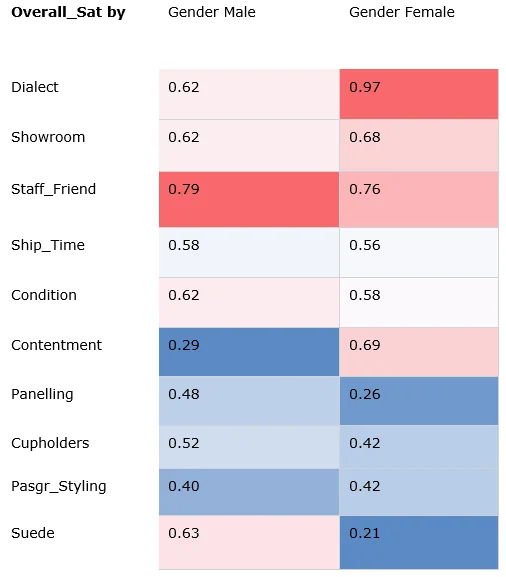
A correlation of 0.21 is weak, not zero. And a difference between groups is a lead, not a result, until you have checked that each group is large enough to give a stable coefficient.
What are the common mistakes?
- Reading a driver chart as cause and effect. The bars rank association. They do not show that fixing the top item will lift the outcome.
- Letting the color scale mislead. A red-to-blue scale on all-positive data makes weak relationships look negative.
- Plotting 5-point data without jitter or bubbles. Overlapping dots hide most of the data.
- Comparing groups without checking sample sizes. Small subgroups produce volatile coefficients.
How do you do this in practice?
In Halo Reports you can cross survey questions with weighting and significance testing, then present the results as charts on an interactive report page. See Halo Reports for what it covers. To check whether a pattern differs by group, you can see satisfaction and loyalty drivers by segment.
Start with your key metric. Build the driver chart, take the top five or six questions into a heatmap to see which overlap, and plot any pair that looks odd before it goes into a report. Teams running wide, complex studies and global brand trackers can keep them in one governed platform.