
You have survey results in a table, and you need people to see the pattern without reading every number. A bar chart is usually the right first choice, because it turns a comparison between categories into a comparison between lengths. This article covers the main types, how to build one from a survey question, and when another chart is the better tool. It is part of our guide to charting survey data, which covers all the common chart types.
Key takeaways
- A bar chart compares values across categories using bar length, so you can see at a glance which categories are larger or smaller.
- Horizontal bars suit long category names and ranked lists, while columns suit short labels and ordered categories such as age bands or survey waves.
- Start the value axis at zero, because readers judge bars by length and a cut axis exaggerates differences.
- To build a bar chart from a survey question, convert counts to percentages of the base, check the total, sort the bars and label each one.
- Choose a line chart for trends across many time points, a histogram for continuous numbers, and a table or top ten for dozens of categories.
How do you read a bar chart?
Read a bar chart in four steps.
- Check the title and the axis label to see what the bars measure: a count, a percentage, an average score.
- Find the base, such as “n = 800 respondents”, so you know who the numbers describe.
- Confirm the value axis starts at zero.
- Compare the bar lengths. If one bar is twice as long as another, its value is twice as large.
That last step only works when the axis starts at zero, because the bar length is the data.
What are the types of bar charts?
All bar charts use length to show value. The types differ in how many series they show and how the bars are arranged.
| Type | What it shows | Best for |
|---|---|---|
| Horizontal bar | One value per category, bars running left to right | Long category names, ranked lists |
| Column (vertical bar) | One value per category, bars running up | Short labels, ordered categories, time periods |
| Grouped (clustered) | Several series side by side within each category | Comparing a few groups on the same question |
| Stacked | Series stacked into one bar per category | Showing a total and how it splits |
| 100% stacked | Series stacked, each bar scaled to 100% | Comparing the mix of answers across groups |
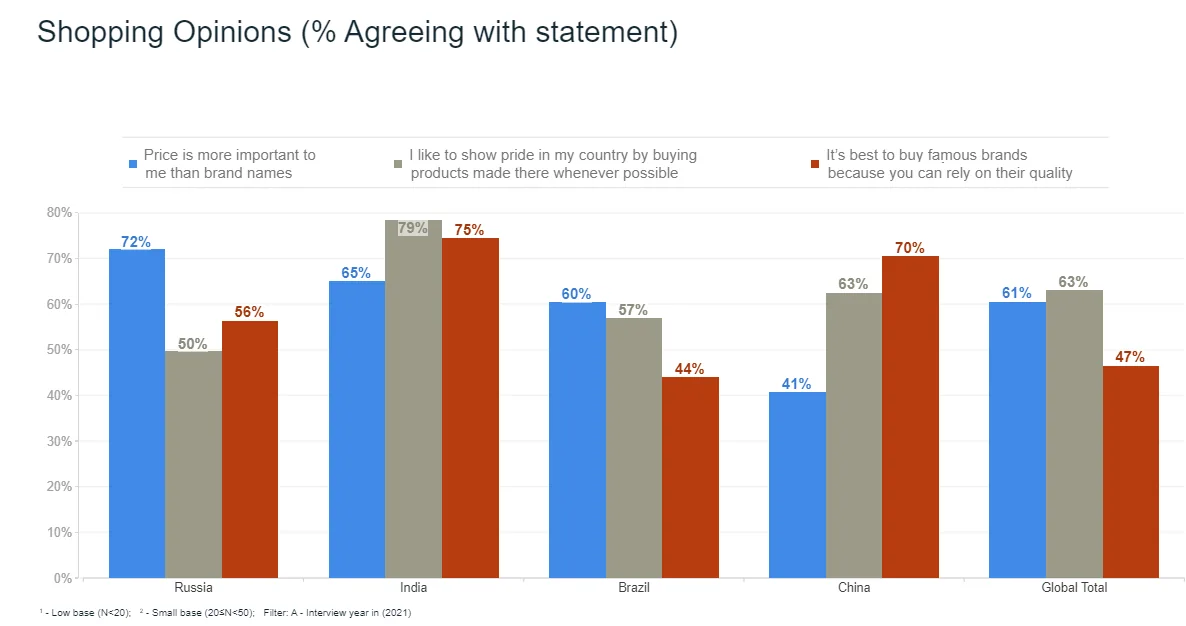
A grouped chart makes it easy to compare neighboring bars, as in the chart below, where each country has three bars for three statements.
A stacked chart shows how each bar divides into parts. Only the bottom segment sits on a common baseline, so the other segments are harder to compare across bars. A 100% stacked chart fixes the bar length at 100% and lets you compare the mix, which makes it the natural choice for rating scales. The example below shows agreement with “price is more important to me than brand names” by country.
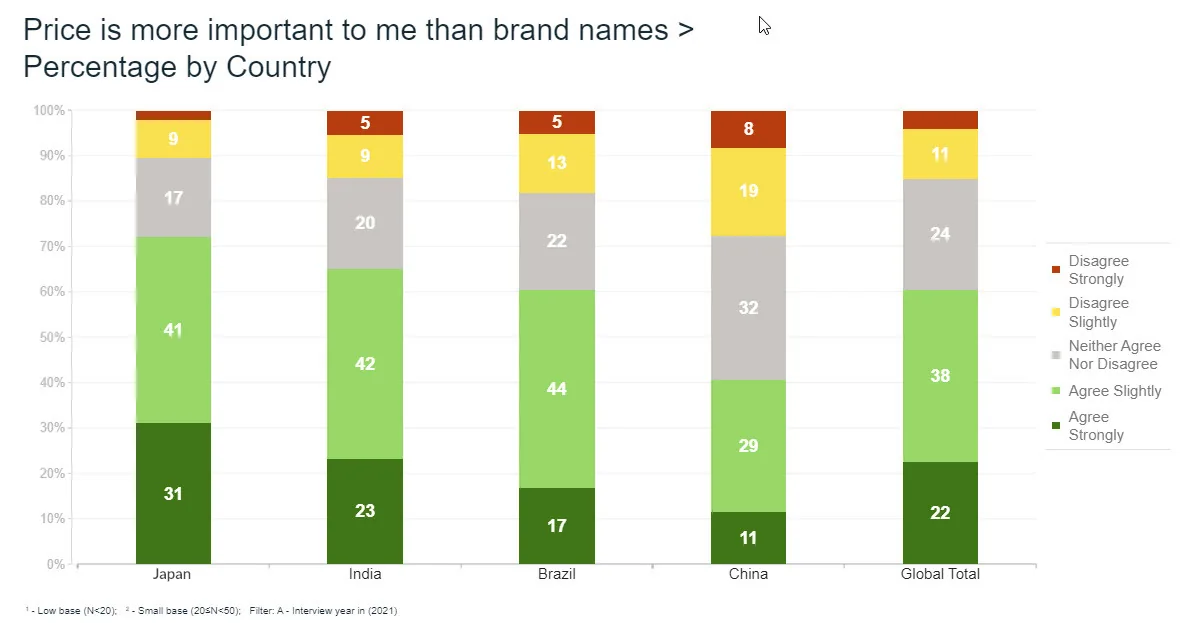
Add the two agree segments and you get the combined share. For the global total, 22% agree strongly and 38% agree slightly, so 22 + 38 = 60% agree overall. In China, 11 + 29 = 40%. Our guides to stacked bar charts for survey data and using the Likert scale go deeper.
What is the difference between a bar chart and a column chart?
The difference is orientation. A column chart has vertical bars, and a horizontal bar chart has horizontal ones. The data, the logic and the reading rules are identical. Some software calls both “bar charts”.
Choose by the labels and the data. Horizontal bars suit long category names, because the text sits on the left in one line and stays readable. Columns suit short labels and anything with a natural left-to-right order, such as age bands or survey waves. Our column chart guide covers when to use each.
How do you build a bar chart from survey data?
Say you asked 800 respondents “What is the main reason you chose your current phone plan?” and each person picked one answer. The numbers below are illustrative.
- Tabulate the question. Count how many people chose each answer.
- Convert counts to percentages. Divide each count by the base (800), then multiply by 100.
- Check the total. For a single-choice question, the percentages should add up to 100.
- Sort the bars from largest to smallest, with “Other” last.
- Chart the percentages with a label on each bar and the base in the title or footnote.
| Main reason | Respondents | Share of 800 |
|---|---|---|
| Price | 296 | 296 ÷ 800 = 37.0% |
| Network coverage | 208 | 208 ÷ 800 = 26.0% |
| Data allowance | 136 | 136 ÷ 800 = 17.0% |
| Brand | 96 | 96 ÷ 800 = 12.0% |
| Other | 64 | 64 ÷ 800 = 8.0% |
| Total | 800 | 100% |
Check: 296 + 208 + 136 + 96 + 64 = 800, and 37 + 26 + 17 + 12 + 8 = 100. Price leads, coverage is a clear second, and price is 296 ÷ 208, about 1.4 times as popular as coverage.
Comparing two groups
Now split the same 800 people into 400 aged under 35 and 400 aged 35 and over.
| Main reason | Under 35 (n = 400) | 35 and over (n = 400) |
|---|---|---|
| Price | 180 (45.0%) | 116 (29.0%) |
| Network coverage | 80 (20.0%) | 128 (32.0%) |
| Data allowance | 70 (17.5%) | 66 (16.5%) |
| Brand | 40 (10.0%) | 56 (14.0%) |
| Other | 30 (7.5%) | 34 (8.5%) |
Each column adds to 100%, and the counts add back to the totals above (180 + 116 = 296 for price). A grouped bar chart with two bars per reason shows that price matters more to the younger group, by 16 points (45 − 29), while coverage matters more to the older one, by 12 points (32 − 20). Because the group sizes are equal, percentages compare cleanly. With unequal groups, always show the percentage and state each base.
How do you design a bar chart people can read?
- Start the value axis at zero. Readers judge bars by length, so a cut axis exaggerates differences. Take 72% and 64%. The true ratio is 72 ÷ 64, about 1.13. Start the axis at 60 and the bars measure 12 and 4 units, so one looks three times as long as the other.
- Sort by value. Rank bars from largest to smallest so the order carries the message. Keep the natural order when categories have one, such as age bands, time periods or a rating scale, and put “Other” and “Don’t know” last.
- Label the bars directly. Put the value at the end of each bar and drop the gridlines, so nobody has to trace a line back to an axis.
- Use one color, then highlight. Color every bar the same and give the bar you are discussing a contrasting color. Use different colors only when they mean something, such as different series in a grouped chart.
- Use the same scale across charts you want readers to compare side by side.
- Write a title that says what and who, such as “Main reason for choosing a phone plan, % of 800 respondents”.
- Keep it flat. Skip 3D effects, which distort the bar lengths.
When should you not use a bar chart?
A bar chart is the wrong tool in these cases.
- Trends across many time points. A line chart shows direction and turning points better than 24 bars. A handful of survey waves is fine as columns.
- Parts of a whole with two to five slices. If the message is “about half” or “a small minority”, a pie chart can be quicker to read.
- The distribution of a continuous number. Use a histogram, where bars touch to show ranges.
- Dozens of categories. Show the top ten and group the rest, or use a table.
- Two numeric variables. To see how two numbers relate, a scatter plot fits; bars do not.
How do you make a bar chart in practice?
Tabulate first, then chart. In Halo Reports, you can run weighted crosstabs with significance testing and turn the results into charts and interactive report pages, so the chart you share is built from the same numbers as your tables. If you run the question every wave, mTab Pulse monitors trackers and studies and surfaces meaningful movement, so the changes worth charting reach you first.
Before you build your next one, write down the single comparison the chart should make. Then sort the bars, start the axis at zero, label each bar and state the base. If the chart still needs a paragraph of explanation, try a different type. For a leadership audience, an executive brief can turn the finding into a one-page update of what changed, why it matters and what to do.